
Claude in Excel is a massive paradigm shift for financial modeling, turning hours of manual formula-building into minutes of intelligent generation. But to get the most out of it, you need a sophisticated base model, a deep understanding of what you are building, and the ability to verify outputs quickly. Here are the 10 best use cases, pro tips, and best practices for leveraging Claude in Excel.
I have been testing Claude in Excel for weeks now. And honestly? I am kind of blown away.
From 2019 to 2022, my life was manual formulas, endless Googling, and praying my VLOOKUP worked. From 2023 to 2025, I used ChatGPT for complex formulas. It helped, but it was still tedious. In 2026, it is just prompting. I have created over 10,000 rows of data through Claude, and it was mostly perfect. The only times it messed up were when I got lazy with my prompts.
What surprised me most is not just that it works, but how well it works. Formulas are perfect. Referencing is nailed. Formatting is better than I would do manually. But here is what really got me: it adds structure, design, explanations, and headers that actually make sense. It does not just fill cells; it thinks about how the sheet should work and look.
The Shift from Manual Entry to AI-Assisted Strategy
The finance function is at a crossroads. For decades, we have been constrained by the mechanical limits of spreadsheet software. We spent our days wrestling with syntax, auditing nested IF statements, and manually tracing dependents across thirty tabs. The shift we are seeing with Claude in Excel is not just about writing formulas faster. It is about elevating the finance professional from a spreadsheet mechanic to an architectural designer.
When you remove the friction of syntax, you unlock the ability to think entirely in terms of business logic and structural flow. You are no longer translating your financial acumen into Excel's language; Claude does the translation for you. This means you can iterate on complex models at the speed of thought. The barrier to entry for advanced modeling drops, but the premium on deep financial understanding skyrockets.
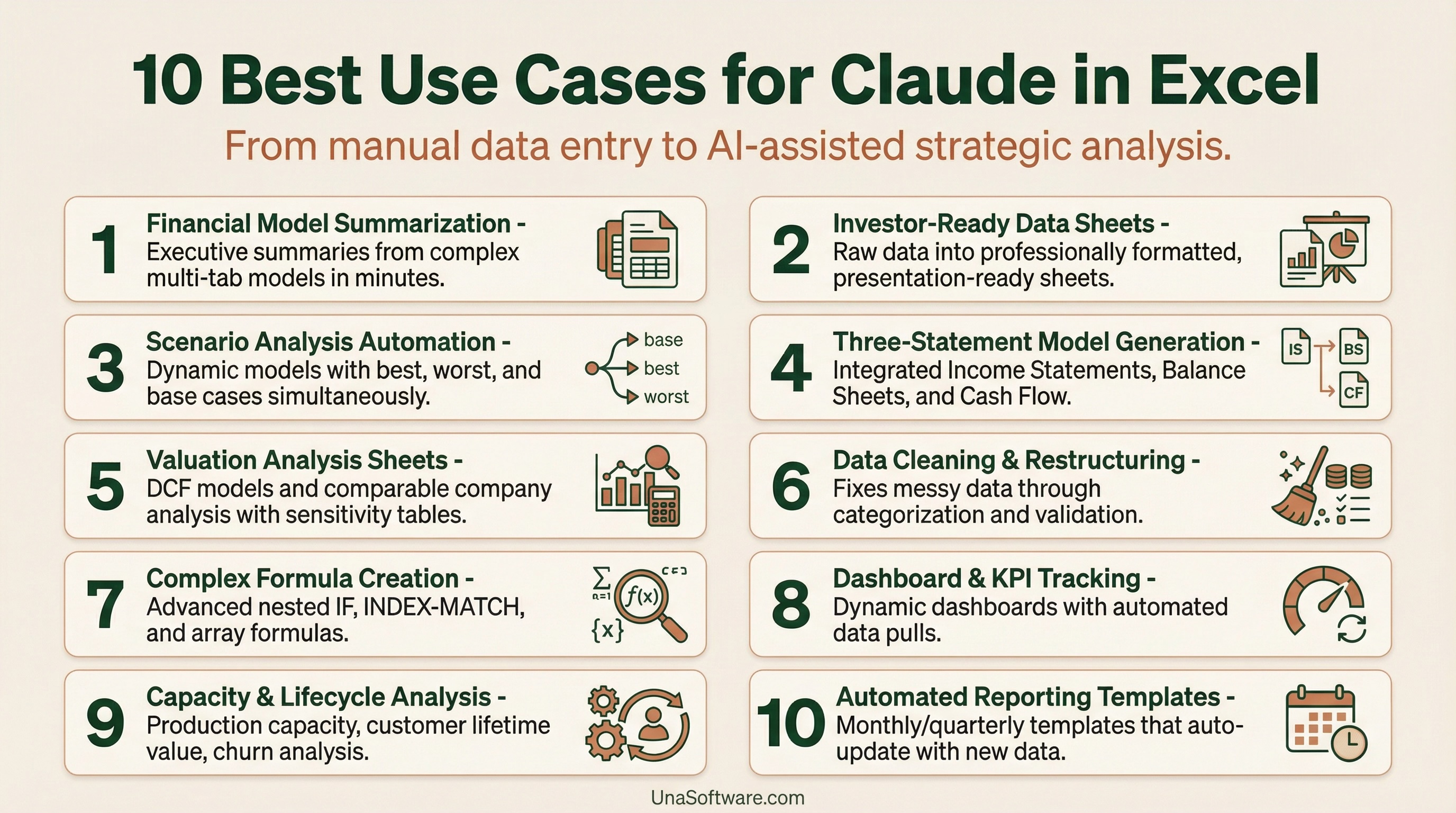
10 Best Use Cases for Claude in Excel
Here is exactly how I have been using Claude to supercharge my financial modeling, transforming raw data into strategic assets.
Pro Tips and Best Practices
The real power of Claude in Excel is having a good base model. Claude supercharges analysis when you already have solid foundations. Give it good assumptions and supporting sheets, and the complex analysis layers become trivial.
You need to understand financial modeling.
This is not magic. If you know how Excel works, you will know how Claude works. You need to understand referencing, formula logic, and data flow. Claude is a co-pilot, not an autopilot. If you ask it to build a model without understanding the underlying accounting principles, you will end up with a highly formatted disaster.
You have to check the outputs.
I manually verified most of it, and while I could not believe it was that good, you cannot blindly trust AI with financial data. You must have the skills to quickly audit the logic, trace the precedents, and ensure the structural integrity of the model.
A sophisticated base model makes all the difference.
My prompts were messy, but my underlying model was detailed and well-structured. That made all the difference. Good prompts help, but a sophisticated base model is what makes Claude shine. It needs a logical framework to operate within.
What to Do Next
If you are doing any kind of financial modeling or complex Excel work, you need to try Claude in Excel. Here is how to start:
1.Start with a clean structure. Before prompting Claude, ensure your data is organized logically. Separate your inputs, calculations, and outputs into distinct sections or tabs.
2.Write descriptive prompts. Do not just ask for a formula. Explain the business logic, the desired outcome, and any specific formatting requirements.
3.Audit immediately. As soon as Claude generates a section, trace the precedents and check the math. Do not wait until the entire model is built to start debugging.
4. Build iteratively. Do not ask Claude to build a full three-statement model in one prompt. Start with the revenue schedule, verify it, then move to COGS, and so on.
5.Learn from the output. Pay attention to how Claude structures its formulas and formats its sheets. It often uses best practices that you can incorporate into your own manual work.
I have not had this much fun with an AI tool since GPT first launched. The friction of financial modeling is disappearing, leaving only the pure strategic challenge of business planning. Just make sure you understand what you are building, can quickly verify if it is right or wrong, and have a solid base to work from.
If you are looking for an enteprise platform that takes this AI-native approach to the next level, integrating directly with your CRM and operational data for true performance planning, you should explore platforms like Una.AI The future of FP&A is here, and it is incredibly exciting.
Upvote1Downvote0Go to comments